







How User Ratings and Reviews Impact App Store Optimization
Reviews help an app team see where the product or its promise falls short. Prospective users read them too. This guide explains how to use that feedback in App Store Optimization, ask for honest reviews and assess changes without buying ratings or promising a ranking uplift.
Table of Contents
The Role of Ratings and Reviews
Ratings give prospective users a quick summary of reported app experiences; written reviews add context. Read both by territory, recent release and recurring issue where the store provides that information. A single target such as 4.3 or 4.9 stars is not a universal threshold for success. Use your own listing and customer feedback to find the product problems or trust barriers worth addressing.
Check your own listing: our free ASO Checker scores your App Store or Google Play listing in about 20 seconds and lists what to fix first.

Written reviews can reveal recurring needs, confusing expectations and defects. Use those themes to improve the product and explain it accurately. Do not promise that inserting keywords into review text will improve Google Play rankings, or ask users to write a particular phrase for that purpose.
How Ratings and Reviews Impact App Store Optimization
Ratings and reviews can affect whether a prospective user trusts the listing. They also provide evidence of product problems or an expectation mismatch. Track recurring themes and changes after releases, but avoid treating a rating improvement as a guaranteed ranking or download uplift.
For a fitness app, repeated complaints about an unclear trial offer or workout failures are actionable signals. Investigate the issue, fix the product or explanation, and review feedback after the change. A favorable review is useful social proof, but one example does not demonstrate that the store’s ranking or conversion rate will increase.
Treat ratings and reviews as part of the listing’s trust and feedback system. Monitor whether a change affects your own store conversion and customer experience; do not assume a fixed effect across every app, category or market.

Strategies to Improve Ratings and Reviews
Start with recurring product issues, then review when and how the app asks for feedback. The aim is an accurate picture of user experience, not a process that filters out unhappy customers.
Encourage User Engagement
Ask for honest feedback at a natural break after the user has had time to experience the app. Provide a separate route for support, but do not use it to screen unhappy users out of the review request.
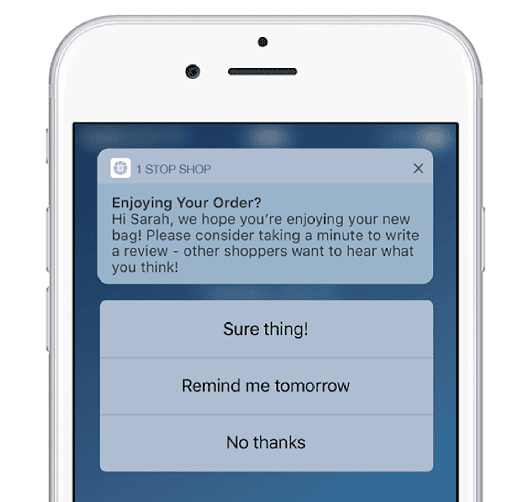
1. Prompt for Ratings and Reviews: Implement in-app prompts asking users to rate and review your app at strategic moments, such as after a successful task completion or upon reaching a milestone within the app.

2. Respond to Reviews: Responding to user reviews, especially negative ones, demonstrates that you value user feedback and are dedicated to improving the app. Address concerns, provide solutions, and thank users for positive reviews. This engagement helps build a positive brand image.
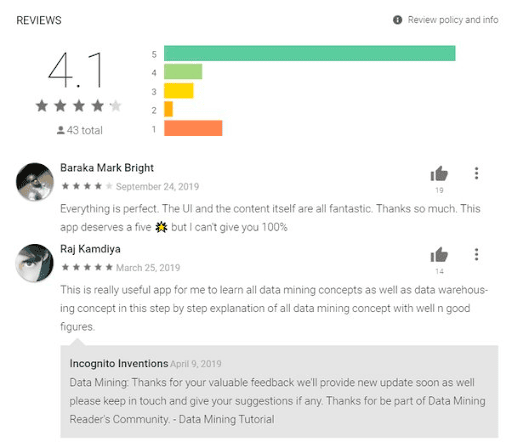
3. Ask for honest feedback without rewards: Do not offer discounts, exclusive content or in-app rewards in exchange for a rating or review, and do not condition access on positive feedback. Google Play’s ratings policy prohibits incentivized ratings and reviews. Apple’s App Review Guidelines also prohibit manipulating reviews and discovery. Resolve the underlying product issue rather than paying for a better score.
4. Monitoring and analysis: It’s important that you continuously analyze your reviews to identify common issues and suggestions for improvement.
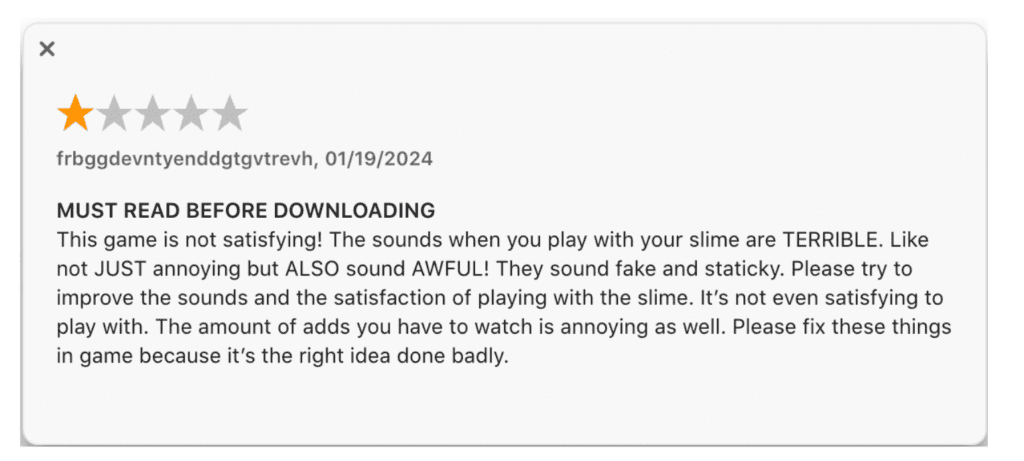
5. Review the most visible feedback: Read the reviews displayed prominently on your listing and compare them with recent review themes. If an old complaint reflects a problem that has since been fixed, respond accurately where the store permits it. Do not assume every store selects or orders reviews in the same way.

6. Use the platform’s review request: Choose a natural break after the user has experienced value, rather than interrupting onboarding or an unfinished task. On Apple platforms, prefer the system-provided review prompt. Do not add a custom positive-only gate or repeatedly pressure users to rate the app.

This historical example asks for five stars. Do not copy that wording: request honest feedback through the platform’s supported review prompt without requiring a score or screening out dissatisfied users.
How To Optimize The User Experience for Better App Reviews
Improving the user experience (UX) of your app is a fundamental aspect of generating positive ratings and reviews. When users have a seamless and enjoyable experience, they are more likely to leave favorable feedback. Below are some of the best practices, we share with our clients:
- Streamline Onboarding: Create a smooth and intuitive onboarding process that guides users through the app’s features. Clear instructions and interactive tutorials can help users understand the app’s value quickly.
- Performance Optimization: Ensure your app runs smoothly, minimizing crashes, bugs, and slow loading times. Regularly test and optimize your app’s performance to provide a seamless experience to users.
- Solicit Feedback within the App: Include an in-app feedback mechanism, such as a feedback form or a “Report a Bug” feature, making it easy for users to report issues. This shows your commitment to addressing user concerns and improving the app.
How You Can Leverage Social Proof
Leveraging social proof can significantly influence potential users’ decisions when considering downloading an app. By showcasing positive ratings and reviews, you can build trust and credibility. Consider the following strategies:
- Use reviews accurately: Ask permission before reusing an Apple App Store review in marketing, keep the quote faithful and attributed, and check the applicable store’s metadata rules before adding testimonials to a listing. Do not imply one customer’s experience is a guaranteed outcome.
- Encourage User-Generated Content: Implement user-generated content features, such as allowing users to share their achievements, screenshots, or testimonials within the app. This not only increases engagement but also fosters a sense of community.
- Keep endorsements separate from store reviews: A disclosed marketing partnership can explain the app to an audience, but it should not be used to buy or manufacture a customer rating. Store reviews need to reflect genuine user experience.
Summarizing: Harnessing User Ratings and Reviews for Optimal App Store Optimization
Keep a simple review log: the recurring complaint, the person responsible for fixing it and the release that addressed it. Check recent feedback after release and use the store’s own conversion report to assess the listing. A stronger rating is useful evidence of customer experience, not proof that ASO caused more downloads.


